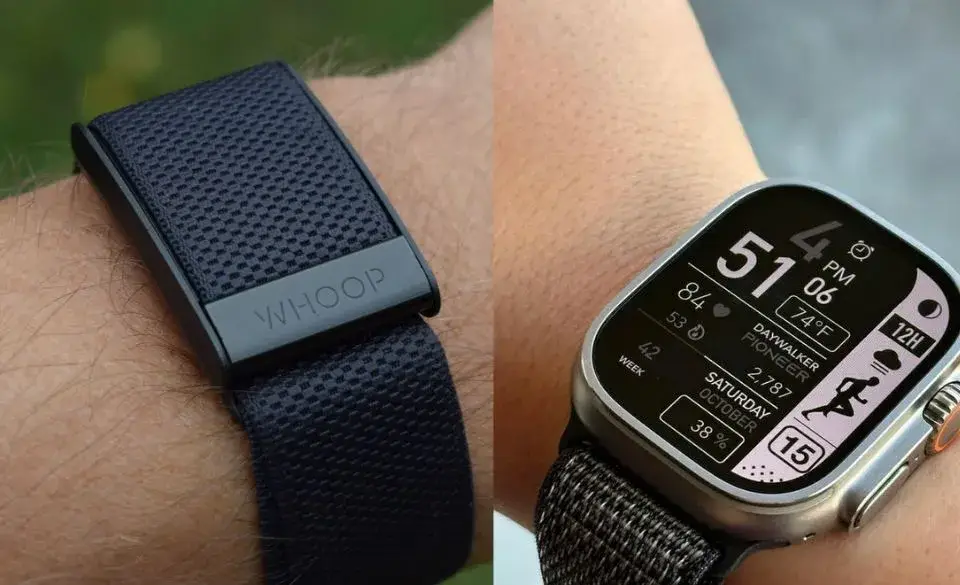
What Makes These Devices So Different?
You might think the Whoop fitness tracker and the Apple Watch fitness tracker are basically the same thing, but they’re not.
Think of the Apple Watch as your digital Swiss Army knife. It tells time, takes calls, tracks workouts, and even lets you scroll memes. It’s a powerful smartwatch for athletes, sure, but it’s also packed with features for daily life. Need to respond to a text during your cooldown? Done. Want to control your music mid-ride? Easy.
Now, the Whoop 4.0? It’s more like your no-fluff performance coach. No screen. No notifications. Just deep, detailed tracking for sleep, recovery, and strain. It’s built for people who want data (not distractions). If the Apple Watch is a multitool, Whoop is a heart-rate-driven drill sergeant focused on long-term readiness, not instant feedback.
Here’s another big difference: Whoop tracks your body 24/7, while Apple Watch tends to focus more on your active periods. You’ll still get insights with Apple, but they’re often driven by activity rings and goals. While Whoop gives you a rolling picture of your entire recovery and strain.
In short, Apple Watch helps you optimize your day. Whoop helps you understand your body.


Whoop for Recovery vs Apple Watch for Performance
Here’s the thing about recovery: it’s where real progress happens.
The Whoop fitness tracker focuses heavily on heart rate variability (HRV), resting heart rate, sleep cycles, and your daily “strain score.” Each morning, it tells you whether your body is primed to push or if you should take it easy. It takes your recent workouts, sleep quality, and stress into account to give a simple score.
It’s like waking up to a coach whispering, “Today’s a green day. Go crush it.” Or sometimes, “You’re in the red. Let’s back off.”
The Apple Watch, especially the Apple Watch Ultra, can track recovery data too—but not with the same depth. You’ll get sleep stats, heart rate info, and even some guided breathing, but it’s not built to prioritize recovery tracking the way Whoop is.
And here’s something many runners miss: Whoop offers weekly and monthly recovery trends. You can look back and actually see how poor sleep or a stressful week affected your ability to train. It’s a long-game mindset.
If you’re someone who’s been burned by overtraining, pushing too hard on low energy days, or trying to “out-grind” fatigue, the best wearable for recovery might just be Whoop


Which Tracks Your Workouts Better?
If you’re chasing Strava segments or working toward a 5K PR, this section matters most.
The Apple Watch fitness tracker shines in real-time workout metrics. You can view pace, distance, heart rate, cadence, and zones—all on your wrist. There’s even audio feedback and detailed post-run summaries. The Apple Watch Ultra adds multisport GPS, precision dual-frequency tracking, and water resistance for open-water swims.
It supports a wide range of workouts too: running, cycling, HIIT, yoga, dance, and even triathlon mode. You can customize what shows on screen mid-workout, set pace alerts, and track elevation gain in real time. It’s like carrying a coach, stopwatch, and trail map all in one.
Whoop takes a different path. It tracks your cardiovascular strain and logs workouts based on heart rate. But there’s no screen, so you can’t check splits mid-run or get coached on the go. You do get post-workout insights, like strain level and recovery impact, but it’s more reflective than reactive.
Here’s an insider tip: if you want to monitor strength training, CrossFit, or less cardio-based routines, Apple Watch tends to give more accurate feedback during the workout itself. Whoop is better if your goal is to assess how that session affects your body overall. Especially when combined with sleep and stress data.
For runners aiming to improve their pacing and form, understanding cadence can be a game-changer.
Check out our guide on Running Cadence: How to Improve Step Rate & Efficiency to learn how to use your wearable’s data to move smarter and avoid injury.
How Accurate Are They? Let’s Talk Data
Data only helps if it’s accurate and both devices do well here, with some caveats.
- The Whoop 4.0 excels in heart rate monitoring, especially during sleep and lower-intensity activities. It’s constantly tracking and adjusting your baseline.
- The Apple Watch has accurate sensors too but can sometimes over-report calories during high-impact workouts like CrossFit or boxing.
That said, Apple’s data is incredibly detailed and easy to digest through the Fitness and Health apps. Whoop, meanwhile, gives you trend insights and coaching recommendations based on your own physiology.
Insider tip: Whoop’s HRV tracking tends to be more consistent because it collects it during the same sleep stage every night. That’s one reason so many athletes swear by it for recovery.
But what about GPS? The Apple Watch Ultra uses dual-frequency GPS, which means it’s more accurate in dense cities, forests, or mountain areas. It locks onto satellite signals faster and stays connected longer, which is a game-changer for trail runners and cyclists.
Whoop doesn’t have built-in GPS. You can link it to Strava or your phone to log routes, but it relies on heart rate data and strain scores (not distance or pace).
So if you’re training by pace or love analyzing routes, Apple wins. If you want biometric trends over time, Whoop delivers more consistent physiological data.


Screen or No Screen? That’s a Big Deal
Here’s a question worth asking: Do you actually want a screen?
Some people love glancing at their wrist to check messages, control music, or view metrics. The Apple Watch gives you all of that and more.
You can use it to take calls, respond to texts with your voice, check weather, or even navigate city streets. It’s a mini-smartphone. And for busy parents, travelers, or anyone who doesn’t want to dig through their phone during a workout, this is huge.
But others find the constant alerts and bright lights distracting. The Whoop fitness tracker is screenless by design. It’s made to disappear on your wrist so you can focus on your body, not your inbox.
It took me a week to adjust to Whoop’s minimalism, but after that, I actually liked being unplugged. Especially during long runs or early mornings. I wasn’t tempted to scroll or reply. I just moved, breathed, and trained.
This design choice also affects durability. No screen means fewer parts that can crack, glitch, or need cleaning. And for people who prefer something discreet under a suit, dress shirt, or gloves, Whoop wins the simplicity battle.
So ask yourself: do you want more connectivity or less distraction?
Battery Life and Charging: Huge Differences
If you’re tired of charging your watch every night, here’s some good news.
- Apple Watch (standard models): About 18 hours. You’ll need to charge it daily.
- Apple Watch Ultra: Up to 36 hours. Better—but still not ideal for multi-day trips.
- Whoop 4.0: Lasts 4–5 days per charge. Even better, you can slide a battery pack right over the band while wearing it.
This one’s a no-brainer for me: Whoop wins on battery life and convenience.
Let’s take it a step further. Apple Watch’s short battery life often interferes with sleep tracking. If you forget to charge it during the day, you’re stuck. And even with low-power mode, it’s not built for true all-day-and-night wear.
Whoop’s charging-on-the-go feature means no downtime. The battery pack slides on while the tracker stays on your wrist. That means no data gaps, no waiting, and no break in continuity. You can go from a workout to sleep tracking without removing it once.
For people who travel, camp, or run multi-day races, this becomes a huge advantage. You don’t realize how annoying daily charging is, until you stop needing it.


How They Handle Sleep Tracking
Best wearable for sleep? That title likely belongs to Whoop.
It tracks sleep duration, disturbances, latency (how fast you fall asleep), and even how much time you spend in REM and slow-wave sleep. It then gives you a daily Sleep Score and adjusts your recommended bedtime based on your recovery needs.
But Whoop doesn’t stop there. It also tells you how much sleep you actually need, based on recent strain, stress levels, and how well you recovered the night before. This is called your “Sleep Need,” and it’s often more accurate than the standard 7–8 hours recommendation we’ve all heard.
Even more impressive? You get personalized coaching like, “Tonight, aim for 8 hours and 20 minutes to fully recover.” That level of detail makes it easy to adjust your bedtime to match your training.
Apple Watch does offer sleep tracking, but it’s more basic unless you use third-party apps like AutoSleep. It records total sleep time, start and end time, and average heart rate during the night. While helpful, it doesn’t offer the same predictive tools or depth of analysis.
And don’t forget, you’ll need to carve out time to charge your Apple Watch during the day, or you might miss a night of tracking. For anyone serious about recovery or training load management, Whoop’s sleep system is the standout.
Sleep quality directly affects your ability to recover and train well. For a deeper look at balancing training and rest, read What Hard Running Days Should Really Look Like.


Subscription Models: What Are You Really Paying For?
Let’s break down what you’re paying.
- Apple Watch: You buy it once (starting around $400 AUD), and it’s yours. Some features are free, and others (like Apple Fitness+) require a small subscription.
- Whoop: The band is free, but you must subscribe (around $30 AUD/month). No subscription, no data access.
That recurring fee turns some people off. But for serious athletes or people wanting deep recovery insights, the Whoop fitness tracker offers value that grows over time.
Here’s the thing most new users don’t realize: you’re not paying for the device, you’re paying for the data engine behind it. Whoop’s app continuously learns about your body, your patterns, and how you respond to stress and workouts. The longer you wear it, the smarter it gets.
Over time, you’ll see monthly reports, performance trends, and personalized coaching you won’t get with most wearables. That’s part of what makes it worth the price (if you actually use the data).
Apple Watch offers a more budget-friendly path in the long run, especially if you don’t want monthly fees. And because it’s more than a fitness device (it’s also a watch, phone, wallet, and music player), you’re getting more versatility per dollar.
So it really comes down to this: are you looking for a multipurpose smartwatch or a dedicated performance optimizer?
Can You Use Both at the Same Time?
Here’s a question I get asked a lot: Do I have to choose one or can I use both Whoop and Apple Watch together?
The good news? You absolutely can.
In fact, many athletes, coaches, and endurance junkies wear both every day. They use the Apple Watch fitness tracker for real-time data during workouts (pace, splits, elevation, and in-the-moment feedback). Then they rely on the Whoop fitness tracker afterward to assess how hard their body worked and how well they recovered.
It’s a best-of-both-worlds approach.
Here’s a quick example. During my last ultramarathon training block, I wore my Apple Watch to track my trail runs. I got elevation data, time per mile, and route mapping. But it was Whoop that told me when I wasn’t recovering well between sessions—even before I felt tired. That helped me avoid overtraining and nail my race.
Yes, it means wearing two devices. But because Whoop 4.0 is screenless and low-profile, you barely notice it. And if you’re serious about optimizing both your performance and recovery, combining the two can give you the full picture.
If you’re training for multiple sports like triathlon, managing your devices can get tricky. See our review on the Best Triathlon Training App for ways to streamline your data and workouts.


Side-by-Side Comparison: Whoop vs Apple Watch
| Feature | Whoop 4.0 | Apple Watch / Ultra |
|---|---|---|
| Screen | No screen (distraction-free) | Full color touchscreen |
| Workout Tracking | Heart rate-based strain score | Real-time pace, distance, zones |
| Recovery Insights | HRV, sleep, strain, stress | Limited; basic metrics available |
| Battery Life | 4–5 days | Up to 36 hrs (Ultra) |
| GPS | Requires phone (no built-in GPS) | Built-in, dual-frequency (Ultra) |
| Sleep Tracking | Advanced, with coaching | Basic (more with 3rd-party apps) |
| Subscription Required | Yes – ~$30/month | No (device purchase only) |
| Best For | Recovery-focused athletes | Daily use & active lifestyle |
Final Thoughts: Which Wrist Wins?
At the end of the day, Whoop vs Apple Watch isn’t a battle it’s a personal decision.
Both are powerful, thoughtful tools. But they speak different languages.
The Apple Watch speaks in pace, rings, notifications, and real-time motivation. It’s there to move with you, push you forward, and fit seamlessly into your busy life. If you want a watch that doubles as your coach, music player, and digital assistant. This is your match.
The Whoop fitness tracker, on the other hand, speaks in heartbeats, stress scores, and sleep cycles. It doesn’t nudge you, it informs you. It’s for those who want to listen more closely to their bodies, train smarter, and prioritize long-term health just as much as short-term gains.
Let’s be honest, fitness isn’t just about what you do. It’s about how you recover, how you rest, how you adapt.
So ask yourself:
- Do I want more data during workouts or after them?
- Do I want a multi-use smartwatch or a laser-focused recovery tool?
- Am I okay with subscriptions or do I prefer a one-time purchase?
There’s no wrong answer here.
Some days, I love the glance-and-go convenience of my Apple Watch. Other days, I rely on Whoop’s strain and sleep metrics to keep me honest. You might start with one and find value in the other down the road.
Whatever you choose, remember this: the best wearable is the one that helps you stay consistent, stay curious, and feel in control of your health journey.
And if you’re working toward a race goal, our Half Marathon Time Chart for Beginners can help you track your progress and choose a wearable that keeps pace with your plan.